None .. An html document created by ipypublish
outline: ipypublish.templates.outline_schemas/rst_outline.rst.j2 with segments: - nbsphinx-ipypublish-content: ipypublish sphinx content
1. Programming for IT specialists only?
1.1. A need for the digital scientist but also the experimenter
Given the evolution of engineering practices, it is unthinkable for an engineer, whether he is a numeric of course, but also an experimenter, not to have basic notions of programming. Consider the example of an engineer in experimental mechanics. We might initially consider that the programming needs of this person are very low. Indeed the caricatural image that we could have is the engineer carrying out a tensile test and keeping at the end only an excel file of force, displacement data.
But this image is completely wrong these days!
Now the tests are carried out on potentially large series of test pieces, with substantial acquisition means such as, for example, cameras. In recent years, the trend has also been towards the development of in-situ tests with the follow-up of tests by tomography.
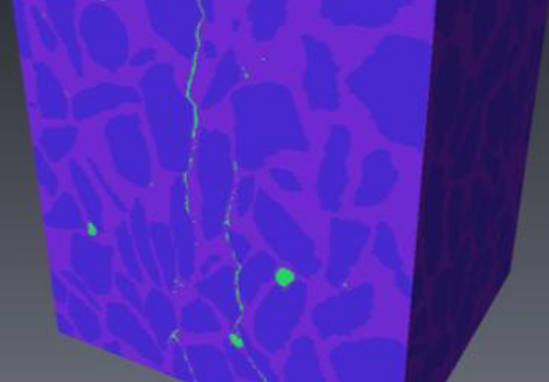
Fig. 1.1.1 media/in-situ-avizo.png
We can then easily imagine that these new acquisition methods generate volumes of raw data which have nothing to do with those generated by a simple extensometer. This is the price to pay for accessing, for the same test, a wealth of information without comparison. Given the volume of raw information, it has therefore become unthinkable to post-process the experimental data without the help of computer science.
And what is true for an engineer in experimental mechanics is true for all fields of engineering in the broad sense of the term. The quantities of data available today are such that it is no longer possible to carry out processing by hand as was done before. It is therefore imperative to know how to automate processing and the only way to do this is through programming.
2. Why is python among so many different solutions?
A natural question that one can ask oneself is why learn Python rather than another language? Indeed in the world of computing and programming there is a whole zoology of programming language (several hundred languages). Why is Python more than another then?
There are many reasons for choosing Python. The short answer to the previous question is “since 2015 the programming language chosen by the Ministry of National Education is Python”. Indeed a few years ago this course would certainly have been carried out using Matlab which then had the monopoly of programming at higher education level in France. But to come back to the choice of Python, the latter is motivated by the fact that:
Python is Open Source, …
This therefore implies that there is no paid license necessary to use Python, unlike Matlab which is paid software. So anyone can install Python on their personal computer for free, write and redistribute Python programs freely.
… therefore has a very large and very active community
The Python language being open source, it has a very extensive geek community, ranging from high school students who do it for fun on weekends to research engineer in data analysis at Google. So there are many forums where most of the issues you will encounter have already been discussed and resolved. One of the most active forums being stackoverflow. So if you have a hard time doing something don’t hesitate to check it out. Another important aspect of this very active community, besides the forums and tutorials, are the modules available. We will see it in the rest of the course, but basic Python ** does not know how to do a lot of things, for what interests us anyway. On the other hand, there is an exorbitant number of additional modules developed by people from all backgrounds allowing to enrich the language with additional functionalities, for example matrix calculation, image analysis, graph drawing, …
and finally it is easy to learn since it is high level.
Finally, one of the reasons for choosing Python rather than something else is that it is a so-called high-level language as opposed to low-level language (such as FORTRAN, C, …).
In addition, Python is an interpreted language which facilitates the learning and debugging development process.
Note: A programming language is said to be interpreted, as opposed to compiled, when the design process is limited to: (i) writing the program; (ii) execution. While a compiled language has an additional step between writing and execution, it is the compilation step. The purpose of this compilation step is to translate the program written by the programmer (in C / C ++ / FORTRAN / …) into a set of machine instructions and it is then this set of instructions that is executed when the we launch the program.
3. Prerequisites, objectives and evaluation
The objective of this course is to give you the necessary bases in Python which will allow you thereafter: (i) to be at ease to carry out automated and powerful experimental data processing; (ii) to be able to carry out simple numerical simulation programs; (iii) have a sufficient understanding of Python to enable you to search for information on the forums or in the documentation for additional modules on your own.
No particular prerequisite is necessary for a good understanding of the course, except knowing how to use a computer at a minimum. The course is broken down into 6 sessions of 3 hours. The evaluation of the module is done in two parts: 30% of the mark is on participation, attendance and investment during practical work 70% of the mark is based on carrying out a project in pairs (the subject of which will be given in the penultimate session) which will be the subject of a defense (approximately 20 minutes).
4. The Python environment
4.1. Installation
To use Python you must first install it. On most Linux operating systems a Python is already installed by base, generally version 2.7, it is however recommended to follow the installation instructions which will follow in order to have a Python environment which is identical to the one used for this course.
The installation procedure is the same for Linux, Mac OS or Windows. There are of course many possible solutions to install Python and all its dependencies and extensions but the one chosen here (the easiest from my point of view) is to install the Python Anaconda distribution www.anaconda.com. The Anaconda distribution is an installation program that allows you to very easily install Python as well as a wide variety of scientific modules available in the Python ecosystem.
4.2. Using python as a calculator
First, the easiest way to use Python is at the command line like a calculator. For that : On windows: in the menu-> program-> Anaconda3 On Linux and Mac: open a terminal and type python
You then have a minimalist window (called a console or a terminal) with a command prompt (the prompt) made up of 3 chevrons “>>>” this is where you can write Python commands. But for now we’re only going to have fun using it as a calculator.
[1]:
2+3
[1]:
5
[2]:
4*3+10 ### Je peux mettre un commentaire derrière à l'aide du symbole #
[2]:
22
[3]:
2-7*4.2 , 19.1*-0.354
[3]:
(-27.400000000000002, -6.7614)
To exit the Python command prompt all you have to do is type exit () or press Ctrl + d
4.3. A more user-friendly environment
The console is a bit austere you will tell me. And I could not agree
with you. First of all for a use of python in interactive mode but more
sympathetic you can use ipython. This is what I would call a luxury
console for python. The advantage is that ipython works with a cell
system and has advanced completion functionality.
But for the writing of program which one wants to keep for future uses the use of the python interpreter is not possible because nothing is saved. So you need a text editor. There is a whole zoology of text editor (emacs, vi, gedit, notepad ++, …) but if you don’t have a preference I can only advise you to use Visual Studio Code (https: // code .visualstudio.com /). Otherwise another alternative is to use the Spyder IDE. The latter is presented as a graphical interface far resembling that of Matlab / Scilab with an explorer of variables, a history, direct access to the documentations of the main Python modules, a file manager, …
4.4. For the curious … Jupyter and notebooks
Finally, a last possible way of using Python is to go through the Notebooks (used for the development of this course). The concept of Notebook introduced at the base by the Mathematica software is to have in a single file (the rendering of which will be managed here by the web browser) different cells which can be made up:
of Python code that will be interpreted of the displayed results of the Python code images (static or generated by Python code) formatted text that may contain equations
The interest of this tool is thus to be able to present with numerous explanations and a clear layout a Python program and its results.
To create a notebook and especially launch the interface to edit them, just type in your console
```` jupyter notebook`` ``
This will then automatically: (i) start a local server on your computer which will be responsible for managing your notebooks; (ii) launch your web browser on the notebook home page.