None .. An html document created by ipypublish
outline: ipypublish.templates.outline_schemas/rst_outline.rst.j2 with segments: - nbsphinx-ipypublish-content: ipypublish sphinx content
10. Course exercises
Basile Marchand (Materials Center - Mines ParisTech / CNRS / PSL University)
10.1. Slicing exercise
create the string: I love python and numpy! 1.access the first and last character of the string ‘I’ and ‘!’
cut the chain to keep only “love”
reverse the chain:! ypmun dna nohtyp evol I
cut the chain to keep only “Ilv pto ad nmy”
10.2. Exercises on strings
10.2.1. Exercise 1
create a string in python
print the string and its length using an f-string
create another character string
concatenate the two strings
put the result in uppercase
10.2.2. Exercises 2
create a multi-line string and display it
split the string to obtain a list of lines (split method)
display each line using a for loop by prefixing it with its number
10.3. Exercise on the lists
build a list containing an integer, a character string, a float, a boolean
modify the first element of the list
slice the list so as to keep only one element out of 2 from the beginning
test if an element is in the list
create a new list containing a list itself
concatenate the two lists
print with a for the elements of the list
10.4. Exercise on dictionaries
create a dictionary with pairs of people described by name and age
display the type of a dictionary
test if a person is in the dictionary and if so modify his age
Apply the items function to the dictionary, what does it return?
print with a for the names and ages of all the people in the dictionary
10.5. Exercises on functions
10.5.1. Exercise 1
The objective of this first exercise is to carry out a Python program allowing an elementary examination of a large number of experimental results. The experimental tests in question are tensile tests on test specimens.
The points of interest that are discussed in this exercise are as follows:
Modularity of the code.
Processing of text files
Simple math function
The expected operation for the program is as follows:
The user provides as input the path to the folder containing all the experimental files
The program lists all the files contained in this folder
For each file: Reading data from file Identification of maximum stress and strain at break
Storage of these quantities in a container
Calculation of the means of the maximum stress and the breaking stress
Calculation of the variances of the maximum stress and the breaking stress
Display of results in the console (with its own formatting)
Write the results in a text file.
The files containing the experimental data can be downloaded at the following address http://bmarchand.fr/download/data/tp1.tar.gz
10.5.2. Exercise 2
In this second exercise the objective is to define an evalPolynom
function which must allow:
Evaluate an arbitrary order polynomial, defined by its coefficients, into a given
xvalue.Return, if the user requests it, the values of
Msuccessively derived from this polynomial evaluated atxas well.Display a clear help message via the
helpfunction
10.6. Exercises on the classes
10.6.1. Exercise 1
In this first exercise you will define a class Vector2D
andVector3D having:
for private attributes:
valuesa list of doubles (2 values forVector2Dand 3 values for ̀Vector3Dsizean integer specifying the size of the vector
The desired behavior for these two objects is as follows:
Be able to display the vector properly using print
Return the size using the
lenfunctionAccess the values contained in the
valuesattributeHave all the usual operations* Sum of two ̀
VectorDifference of two ̀``Vector`` Term-to-term multiplication of two ̀VectorMake broadcasting, i.e. the sum of a
Vector2and aVector3must return aVector3for which the last component is unchanged.
10.6.2. Exercise 2
Note:
Don’t you find that the previous exercise still involves a lot of copy and paste? You should in any case !!!
The objective of this exercise is therefore to redo exercise 1 by using the concept of inheritance in order to minimize copy and paste.
10.7. Numpy exercise
10.7.1. Data manipulation
The objective here is to redo exercise 1 on functions by now using numpy as much as possible
10.7.2. Image manipulation (thanks V. Roy for the subject)
[1]:
import numpy as np
from matplotlib import pyplot as plt
concepts involved in this lab
on numpy.ndarray arrays * reshape (), tests, boolean masks,
ufunc, aggregation, linear operations on numpy.ndarray * the
other concepts used are recalled (very briefly)
for reading, writing and viewing images * use
plt.imread,plt.imshow * use plt.show() between two
plt.imshow () in the same cell
note
we use the basic functions on the
pyplotimages for simplicitywe do not mean here at all that they are the best for example
matplotlib.pyplot.imsavedoes not allow you to give the compression quality while thesavefunction ofPILallows ityou are free to use another library like
opencvif you know it well enough to get by (and install it), the pictures are just a pretext don’t forget to use the help in case of problem.
10.7.2.1. Sum of RGB values of an image
Read the image
media/les-mines.jpgCreate a new array
numpy.ndarrayby adding with the operator``+`` the RGB values of the pixels of your imageDisplay the image (not terrible), its maximum and its type
Create a new array
numpy.ndarrayby adding with the aggregation function``np.sum`` the RGB values of the pixels of your imageDisplay the image, its maximum and its type
Why this difference? Use the help
np.sum?Make the image grayscale of type 8-bit unsigned integer (whichever way you prefer)
Replace in the grayscale image, values> = to 127 by 255 and those lower by 0 Display the image with a grayscale color map you can use the
numpy.wherefunctionwith the function
numpy.uniquelook at the different values you have in your black and white image
10.7.2.2. Sepia image
To change the R, G and B values of a pixel to sepia (encoded here on an 8-bit unsigned integer)
we transform the values \(R\), \(G\) and \(B\) by the transformation \(0.393\, R + 0.769\, G + 0.189\, B\) \(0.349\, R + 0.686\, G + 0.168\, B\) \(0.272\, R + 0.534\, G + 0.131\, B\) (attention the calculations must be done in floats not in uint8 so as not to have, for example, 256 becoming 0)
then we threshold the values which are greater than
255to255of course the image must then be submitted in the correct format (uint8 or float between 0 and 1)
Exercise
Make a function which takes an RGB image as argument and renders a sepia RGB image.
Spend your patchwork of colors in sepia Read the
media/patchwork-all.jpgfile if you don’t have a custom filePass the image
media/les-mines.jpgin sepia
10.7.2.3. Image compression by SVD
In this exercise the objective is to compress a grayscale image using an SVD (Singular Value Decomposition). The image to compress is as follows:
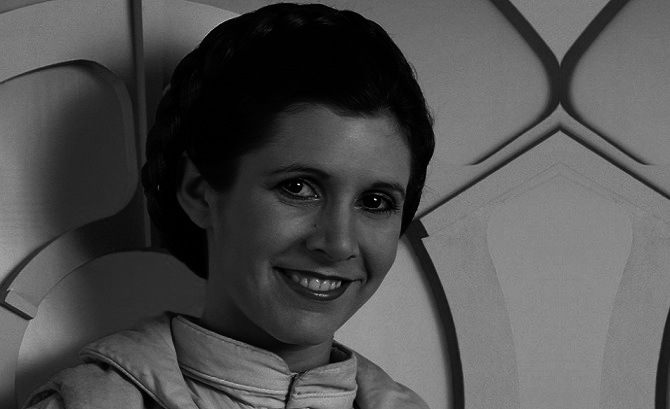
Fig. 10.7.1 data/carrie_fisher.png
As a reminder, the SVD decomposition of a \(\mathbf{A} \in \mathbb{R}^{m\times n}\) matrix is written as follows:
With \(\mathbf{U}\in \mathbb{R}^{m\times m}\), \(\mathbf{\Sigma}\in\mathbb{R}^{m\times n}\) is a diagonal matrix of singular values and \(\mathbf{V} \in \mathbb{R}^{n\times n}\).
Question 1:
Load the image of Carrie Fisher (you will find in the data folder a file carrie_fisher.npy containing the image or in the form of an np.ndarray) and calculate its decomposition into singular values.
Question 2:
Trace the evolution of the singular values of the image.
Question 3:
For different truncations (\(k=\lbrace 1,5,10,15,20,30,50,100 \rbrace\)) reconstruct the image, display it and calculate the compression rate obtained.
10.7.2.4. Solving a system of N springs
[2]:
from IPython.display import IFrame

IFrame("./media/spring.pdf", width=600, height=300)
[2]:
<IPython.lib.display.IFrame at 0x7ff0de5ec390>
The objective is to determine by a matrix approach the response of the system to a \(F\) effort.
The formulation of the problem must therefore be reduced to the resolution of a problem of the form
With \(\mathbf{K} \in \mathbb{R}^{M\times M}\), \(\mathbf{u} \in \mathbb{R}^{M}\), \(\mathbf{F} \in \mathbb{R}^{M}\) and \(M\) the number of points in the system.
For that it is recalled that the potential energy of the system can be expressed in the following form:
With \(u_{i,0}\) the displacement of the first attachment node of the \(i\)-th spring and \(u_{i,1}\) the displacement of the second attachment node of the \(i\)-th spring.
This potential energy can be written in the following matrix form:
Then using the potential energy theorem we can write that
Question 1:
From the expression of the potential energy of a spring define the elementary stiffness matrix.
Question 2:
Use the stiffness matrix of a spring to build the global \(\mathbf{K}\) matrix. To do this, use the notion of connectivity table. As a reminder, the connectivity table is a \(L\) list such that the \(i\)-th element of \(L\) is the doublet of the indices of the spring attachment points.
Question 3:
Build the right hand side \(F\).
Question 4:
Solve the linear system
Bonus:
Using matplotlib, visualize the profile of the matrix \(\mathbf{K}\):
import matplotlib.pyplot as plt
plt.imshow (K)
plt.colorbar ()
plt.show ()
What can we conclude from this? What avenue of improvement is possible to accelerate the resolution of the problem?
10.8. Scipy exercises
10.8.1. EDO resolution
Consider a classical RC circuit defined by the following differential equation:
With \(R=1000\Omega\), \(C=10^{-6}F\) and \(u(t=0) = 0\).
Question 1:
In the case where \(u_e(t) = U_0\) with \(U_0=10\,V\) calculate the solution of the differential equation over the interval \([0, 0.005]\).
Question 2:
In the case where \(u_e(t) = U_0 \sin \left( 2\pi f t \right)\) with \(U_0=10\,V\) and \(f=100\,Hz\) calculate the solution of the differential equation over the interval \([0, 5/f]\).
10.8.2. Solving a system of differential equation
Consider a classical RLC circuit defined by the following differential equation:
Question 1:
Transform this second-order equation into a system of two first-order equations.
Question 2:
Determine the evolution of \(u(t)\) over the interval \(t \in [0, 0.02]\) for \(R=1000\,\Omega\), \(F=10^{-6}\,F\). It is up to you to choose the value of \(L\) to solve: (i) in pseudo-periodic regime; (ii) aperiodic; (iii) critical.
As a reminder :
If we want by using ipywidgets (we have to install it via conda) we
can make an interactive graph with the value of \(L\).
10.8.3. Find the zero of a scalar function
Consider Kepler’s equation:
Question 1:
Using scipy find the solution of Kepler’s equation in the case where
\(e=\frac{1}{2}\) and \(m=1\). Check that the solution found by
scipy is correct.
10.8.4. Parameter identification — RC circuit
Consider the RC circuit previously studied.
We will try to identify the parameter R of the system from
“experimental” data. The experimental data in question are given in the
file notebook / data / exp _data_ rc.dat. If we represent these data
we obtain the following curve:
[3]:
import matplotlib.pyplot as plt
import numpy as np
import pathlib as pl

data = np.loadtxt(str(pl.Path(".") / "data" / "exp_data_rc.dat"))

plt.plot( data[:,0], data[:,1])
plt.xlabel("Time (s)")
plt.ylabel("U (V)")
plt.show()
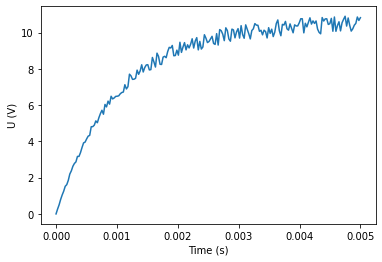
These data are obtained with the following configuration:
Question 1: Formulate the optimization problem to be solved to identify the parameter R?
Question 2: Using scipy.optimize identify the value of the R
parameter.
Question 3: Represent on the same graph the experimental data and the result of the model for the identified value of \(R\).
[ ]:
[ ]: